
Getting into a match on your device
The game runs on PC, mobile and console, and since 22 October you can choose which server pool you land in. When you join, pick CROSSPLAY or MOBILE ONLY, or switch later in Settings. This matters beyond matchmaking: the game publishes separate places for the mobile and console pools, which is why the on-screen layout differs from the PC keybind list.
The game publishes four separate places under one universe, which is why the pools behave differently:
| Place | ID | What it is |
|---|---|---|
| First Person Boxing | 132956556682909 |
The main game page and root place |
| Ranked | 82445285907931 |
The ranked mode runs as its own place |
| FPB Mobile Servers | 93334994845414 |
The mobile pool |
| FPB Console Servers | 139543834238904 |
The console pool |
One step is not confirmed. Several guides tell you to warm up against bots first. The update notes mention that bot fights do not count toward win rewards, and a sparring rule exists, but the entry point for a practice match was not captured here, so this page does not tell you where to click for it.
PC keybinds
The overlay groups controls into defense, movement and view, and system. These rows are read straight from it.
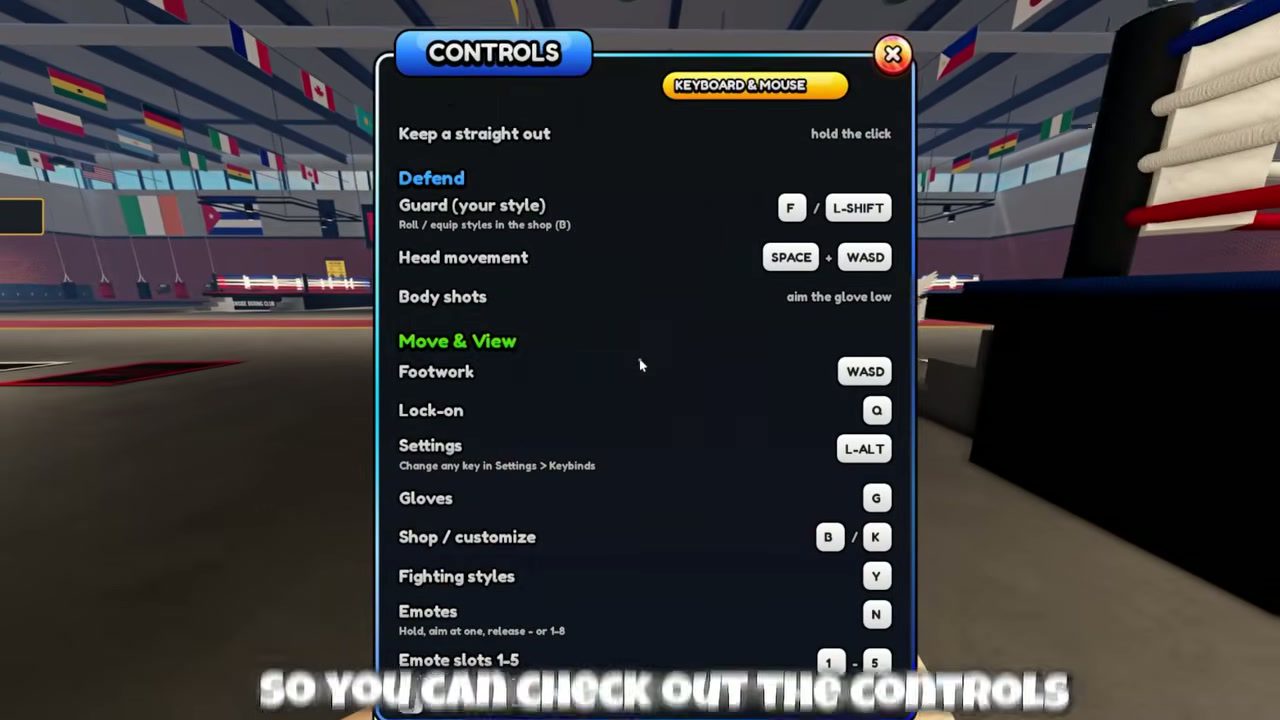
| Group | Action | Input |
|---|---|---|
| Defense | Guard (your style) | F or L-Shift |
| Defense | Head movement | Space + a direction |
| Defense | Body shots | aim the glove low |
| Defense | Keep a straight out | hold the punch input |
| Move & view | Footwork | WASD |
| Move & view | Lock-on | Q |
| Move & view | Settings | L-Alt |
| System | Gloves | Z (was G before 21 Oct) |
| System | Shop / customize | B / K |
| System | Fighting styles | Y |
| System | Emotes | N, then aim and release, or 1–8 |
| System | Hide or show the overlay | H |
The overlay screenshot stops just above the punches section, so the inputs for the punches themselves are not confirmed here — and that is the row most guides get wrong. Player comments report uppercuts on C and V with overhand on X; one third-party article reports uppercuts on W and S, but W and S are the footwork keys in the same overlay, so that reading cannot both be true.
The practical instruction is one line: press H, read the punches row on your own screen, and trust it over any table, including this one. This page will not present two conflicting layouts as if either were usable.
What changed on 21 October
| Before | After |
|---|---|
G opened Gloves |
Z opens Gloves |
| body block did not exist | G holds body block |
Two consequences. A video recorded before 21 October will tell you to press G for gloves. And body block is a hold, not a toggle: on mobile it is hold-only and returns to your previous guard when you let go.
The second half of this is easy to miss: the overlay notes that any key can be changed under Settings > Keybinds. A printed layout — including this table — describes the default, not necessarily your game.
Mobile and console
Mobile uses on-screen buttons, and since 21 October there is a dedicated BODY button for body block. On a controller the equivalents are RT + LT. The 22 October patch also made Shop buttons, the codes box and coin packs usable from a controller.
What is not in this material: the full attack and evasion mapping for either layout. The PC overlay cannot be used to infer them, and no screen capture of the mobile or console prompts was available for this build. Treat those two layouts as unverified here rather than translating the PC table.
Customize and fight rules
Customize also carries Gloves and Trunks tabs with a live preview of your fighter, so a cosmetic change can be seen before you commit it. The Gloves menu itself is separate, and it moved from G to Z on 21 October.
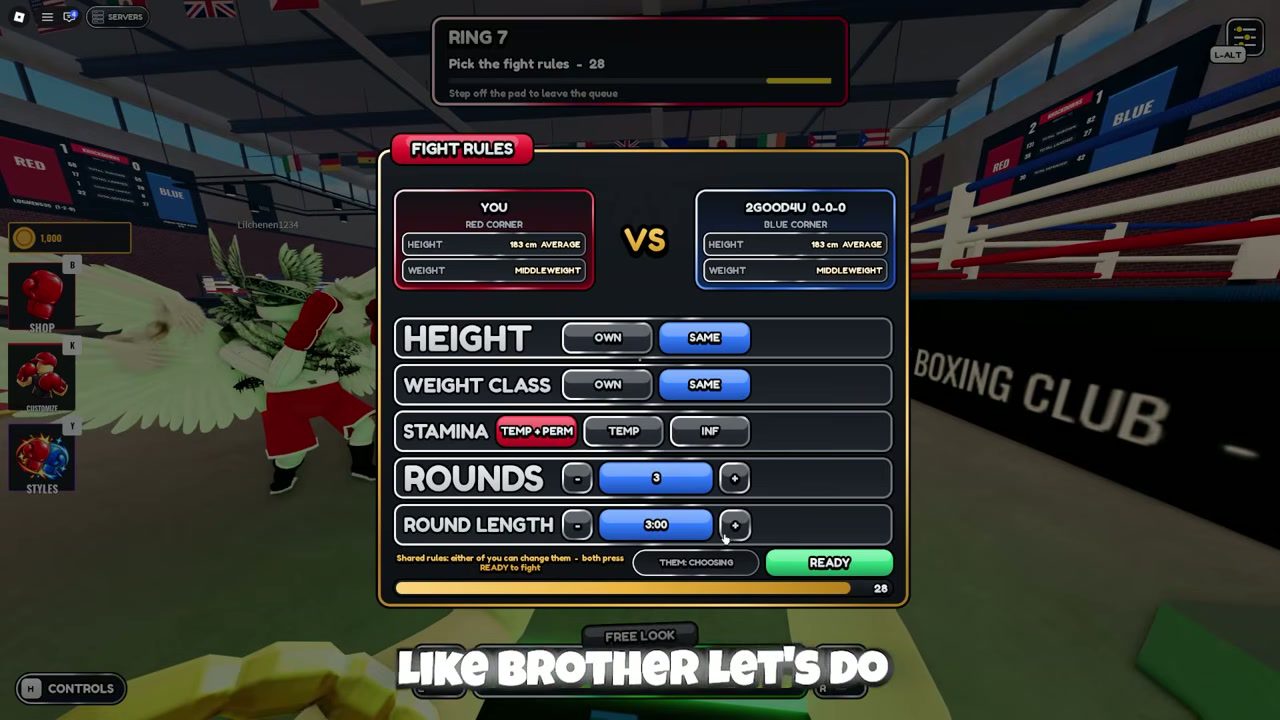
Customize has separate pages for body shape, head shape, weight class and height. The weight class is the only one that moves the two sliders at the bottom of the panel, POWER and CHIN, and those sliders show no numbers. A captured pre-fight panel displayed 183 cm AVERAGE and MIDDLEWEIGHT for both fighters — that is the state of one match, not a documented default.
Before a quick match either fighter can change the rules:
| Rule | Options |
|---|---|
| Height | OWN or SAME |
| Weight class | OWN or SAME |
| Stamina | TEMP+PERM, TEMP, INF |
| Rounds | stepper, the captured frame shows 3 |
| Round length | stepper, the captured frame shows 3:00 |
Both players have to press ready for a change to apply. Ranked does not use this panel: it fixes the same height, same weight and full stamina for both fighters, so physique work pays off in quick match rather than in ranked.
Whether height changes attack speed, damage or reach is not established anywhere in the material, so this page does not claim it does.
When a key does nothing
- Confirm the build. If your guide predates 21 October,
Gis no longer gloves. - Confirm your device and server pool. Mobile and console have their own layouts.
- Open the overlay with
Hand read the punches row where you actually are. - Check
Settings > Keybinds, because any key can have been rebound. - If a menu will not open at all, check whether you are still inside the opening tutorial.
If you have checked the build, the device, the overlay and the keybinding list and it still fails the same way every time, stop re-pressing keys. Record the device, the layout and a clip, and send it through the feedback mailbox in the gym.